For linocut and relief printmakers · iPad and web
The studio companion for linocut and relief printmaking.
Brayer plans the reduction, prints the carving guide at 1:1, remembers the ink recipe, numbers every impression and runs the print exchange. Everything between the drawing and the sale, in one place, with a pencil. What happens after you close Procreate.
Brayer for iPad is coming to the App Store. One purchase, every module. Leave an email and hear once, at launch.

Editions · Hare · edition of 1 + 1 AP · both pulled and photographed · pricing calculator on the right
06Live today · free · no app needed
Run your next print exchange from a browser. Free, for everyone on the roster.
A portfolio exchange is a joy to receive and a chore to organize: a dozen addresses, a dozen deadlines, a dozen envelopes, and a colophon someone has to type up at the end. Brayer gives the organizer one page for all of it: the roster, a join link with a QR code, submission tracking, a message board, mailing labels for Avery sheets, and the colophon as a print-ready PDF.
Participants never need the app. A free account and a six-character code let them confirm their address, mark their prints sent with a photo, and tick off what arrives. The account you create today is the one the iPad app signs in with later, so nothing has to be set up twice.

Exchange · Small worlds, 2026 · 9/12 on the roster · $108 collected, $36 outstanding · the same exchange, on iPad
Six modules, one workflow
Design, separate, carve, log, edition, exchange. In that order, because that is the order you work in.
Each module hands its work to the next in a tap, and every one of them starts from the size of the block on your bench.
- 01DesignDraw on a canvas locked to your block size, with a live mirror and a threshold view of what will actually carve.
- 02SeparatePlan a reduction or multi-block print. Split the drawing into inks, set the print order, watch the simulator pull each pass.
- 03Carve planPrint the carving guide at 1:1, mirrored, with kento or pin registration marks and the right transfer method for your block.
- 04Studio logTime your sessions, keep the ink recipe that finally matched, log which paper took the second colour, know when to sharpen.
- 05EditionsTrack every impression from proof to sale, price the edition from real hours, and issue certificates of authenticity with a QR code.
- 06ExchangeOrganize a print exchange without the spreadsheet: roster, deadlines, mailing labels, colophon. Participants only need a browser.
All six modules in detail, with screenshots of the current build.
02Separate · reduction print planner
See the whole reduction before you cut the first layer away.
A reduction print destroys the block as it goes. Every pass you carve is gone for good, so the order of the inks has to be right before the first cut. Separate takes your drawing, splits it into the number of inks you can afford to print, and lets you drag the passes into printing order.
The print simulator lays each pass over the last so you can judge the overprint, and the block-state view shows what is left standing on the lino, mirrored, at every stage. Export one PDF page per pass at 1:1 and carve from it.
Posterize, threshold and contour extraction are ordinary image algorithms. Nothing here is generated and nothing here is trained on anyone’s prints.
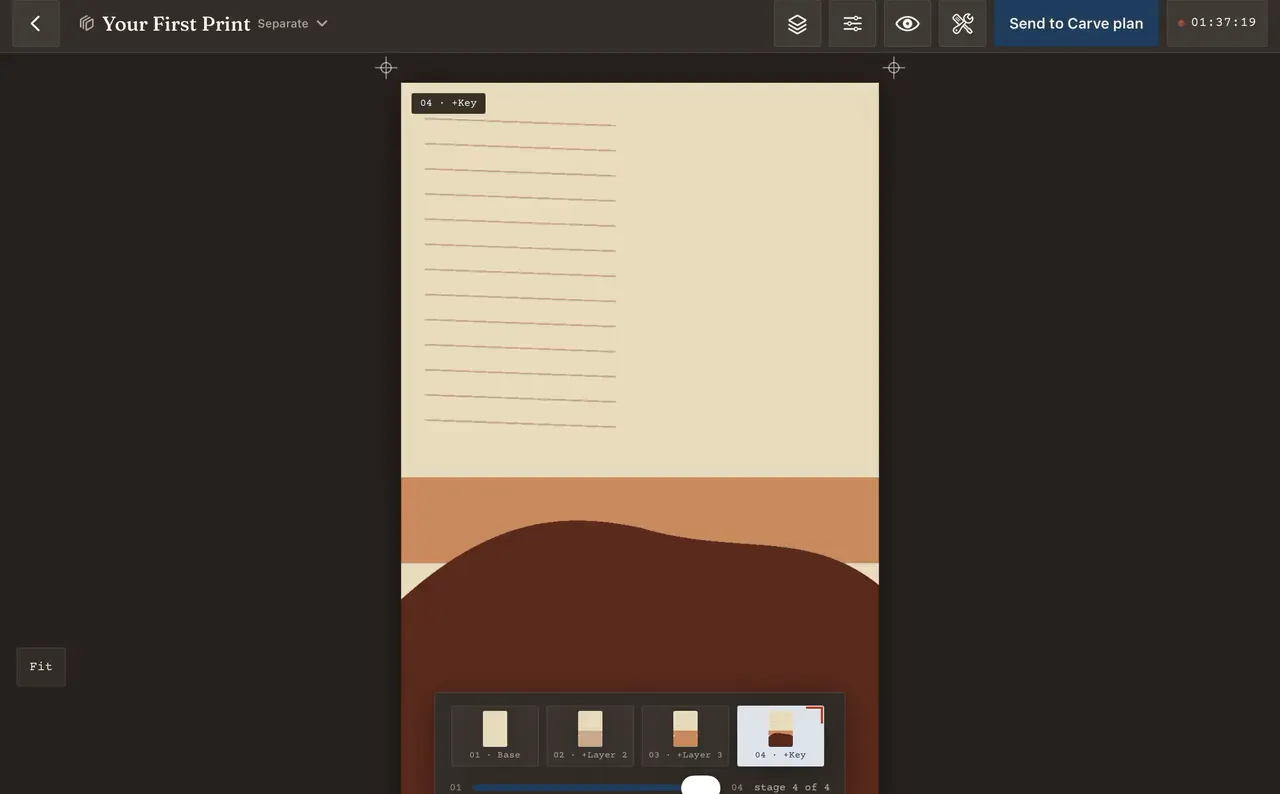
Separate · the print simulator, dragged from stage 1 to stage 4 of 4

Separate · block state, mirrored · what is left standing on the lino
05Editions · edition tracking and certificates
An edition is eight decisions, not one number.
Editions · BAT, AP 1/1, then 1/1 · Generate all COAs and Export CSV in the header
Brayer keeps every impression as its own record: which paper, which pull of the day, whether it is an artist’s proof or the BAT, who bought it and through which channel. Once an edition is closed it stays closed, the way a signed edition does.
The pricing calculator counts your hours from the studio log, so the time at the bench is already there to be charged for. Each certificate of authenticity carries a QR code that opens the impression’s own verification page, and it keeps resolving, because the certificate is paper.
- Impressions
- Numbered, plus AP, PP, TP, HC and the BAT, each with a state and a quality grade
- Where it is
- In studio, framed, with a gallery, shipped, sold, gifted
- Pricing
- Materials, hours at the bench, reputation tier, channel commission and target margin
- Certificates
- Generate all COAs for the edition, or export the whole thing as CSV
Where it stands
Built and running. Beta next, then the App Store.
All six modules are built and running on iPadOS. Every screen on this page is a screenshot of that build, not a mockup. What comes next is a private beta with working printmakers, then the App Store listing at $7.99, one purchase, every module included.
The exchange half is not waiting for any of that. The organizer and participant tools on this site are live now, free, in a browser.
One email when the listing is live. Nothing else, ever.

Studio log · a session running · sessions, hours and impressions this month

Carve plan · transfer guide, mirrored · deep cut, leave, surface cut · Export 1:1

Design · canvas locked to the block · safe area dashed, corner marks at the edge
Three commitments
The things we will not change.
No AI, ever.
No generated images, no generated text, no models trained on your work or anyone else’s. The clever parts are old, well-understood algorithms, and they will stay that way.
Buy it once.
$7.99 at launch, every module included. Studio+ is optional and only covers things that cost money to run, like sync and storage. A gouge does not charge rent.
Your archive is yours.
Every project exports as a .relief bundle: a zip of readable JSON and PNGs with a manifest and checksums that any device can read back. You can leave with everything, which is why you won’t.
More on all three under About, and the full price list under Pricing.