Print exchanges · portfolio swaps
Organize a print exchange in one hour, not ten.
A print exchange is a portfolio swap: a group agrees on a size, a paper and a theme, everyone pulls a small edition, mails it to the organizer, and receives one print from each of the others. The prints are the easy part. The roster, the addresses, the deadlines, the who-has-paid and the mailing labels are what eat the weekend. Brayer keeps all of it on one page, free, in your browser.
Free to organize · free to join · no app required · works on a phone
01If you organize
Everything the exchange needs, on one page.
Set the exchange up once, send the link, and let the roster fill itself in. The parts that used to live in a spreadsheet, a form, a payment note and four group chats live together here.
- Roster
- Names, contact details, mailing addresses and payment status. Import a class list from a CSV.
- Invitations
- One six-character join code, shared as a link or a QR code. Public, or invite only.
- Specification
- The address to send to, image and sheet dimensions, paper, ink, edition per participant.
- Deadlines
- One for submission, one for completion, shown to everyone on the roster.
- Submissions
- Pending, sent, received, complete, per participant, with the photograph they sent.
- Messages
- A board for the whole group, and one-to-one when only one person is late.
- Mailing labels
- Avery 5160 and every 3 × 10 equivalent: 66.7 × 25.4 mm, 30 to a page, printed at 100%.
- Fees
- Collected and outstanding, totalled. You record payments yourself; collection through Stripe is coming.
- Colophon
- A PDF of the finished exchange: every artist, every print, the date. Made to be printed and kept.
All of this runs on this site today, with a free account and no iPad. The screens beside this section show the iPad app holding the same exchange, because the app and the web share one account and one roster.
Want to organize from the iPad app instead? Hear once, at launch.

The same exchange in the iPad app · Small worlds, 2026 · 9/12 on the roster · $108 collected, $36 outstanding. The web organizer pages hold the identical exchange, laid out for a browser.
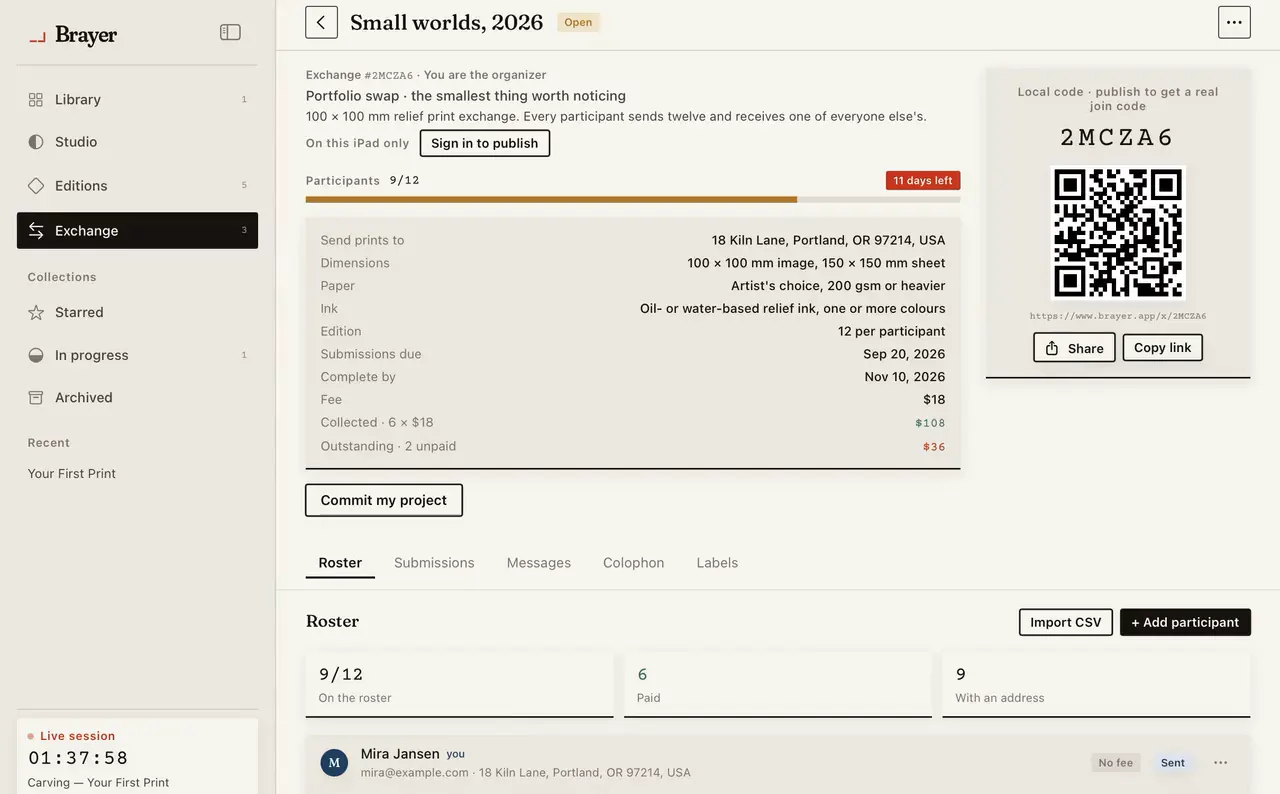
Exchange · roster, submissions, messages, colophon, labels

Labels · Avery 5160 on US Letter or L7160 on A4 · 3 × 10 to a sheet at 66.7 × 25.4 mm · printed at 100%, no fit-to-page
02If you are taking part
A link, an address, and a parcel. That is the whole job.
Participants need no app and pay nothing. A free web account gives you everything the exchange asks of you, on a phone in the studio or a laptop at the kitchen table.
Join with the link, or type the six-character code. Confirm the address your prints should be mailed to, which is where the organizer’s labels come from. Read the specification: paper, dimensions, edition size, theme, deadlines.
When you mail your edition, mark it sent and attach a photograph of the parcel or the stack. As the other artists’ prints arrive, mark them received, one tap each. When the exchange closes and the organizer publishes the colophon, read it and print your own copy.
No app to install, no account to pay for, no group chat to scroll back through.

What the organizer sees as parcels move · sent, received, complete · your own row updates the same counts
03How joining works
Four steps, from the code to the colophon.
- 01
Get the code from the organizer.
A link, a six-character code, or a QR code printed off an iPad and pinned to the workshop wall. All three land you in the same place.
- 02
Create a free account and confirm your address.
Sign up with the name you sign your prints with. The address you enter is what the organizer’s mailing labels are printed from, so read it twice.
- 03
Carve, pull the edition, and mark it sent.
The specification is on one page: paper, dimensions, edition size, theme and both deadlines. When the parcel goes, photograph it and mark your submission sent.
- 04
Mark what arrives, then keep the colophon.
Tick prints off as they land on your doormat. When the organizer publishes the colophon it lists every artist, every print and every edition number, ready to print for the folder.
04And if you have the iPad app
The prints come home to your archive.
Nothing about the exchange changes if you own Brayer for iPad. What changes is that the exchange stops being a separate thing you have to remember.
The impressions you gift into an exchange are marked gifted via exchange against their numbers in your edition record, so the edition still adds up when a collector asks where number 7 went.
The prints you receive from the rest of the roster log themselves into your Editions inventory, with the artist, the exchange and the date attached, instead of sitting in a drawer as an unlabelled stack.
And the exchange stays in the archive. Search it years later by artist, by theme or by year, the same way you search your own projects, ink recipes and papers.